Three Paths to Agentic UI Automation (and the One I'd Bet On)
Three ways an AI agent can drive a browser today. AI-generated code, live driving via MCP or CLI, or composed atomic tools. The math, the tradeoffs, and why letting the LLM click is the most expensive mistake in agentic UI automation.
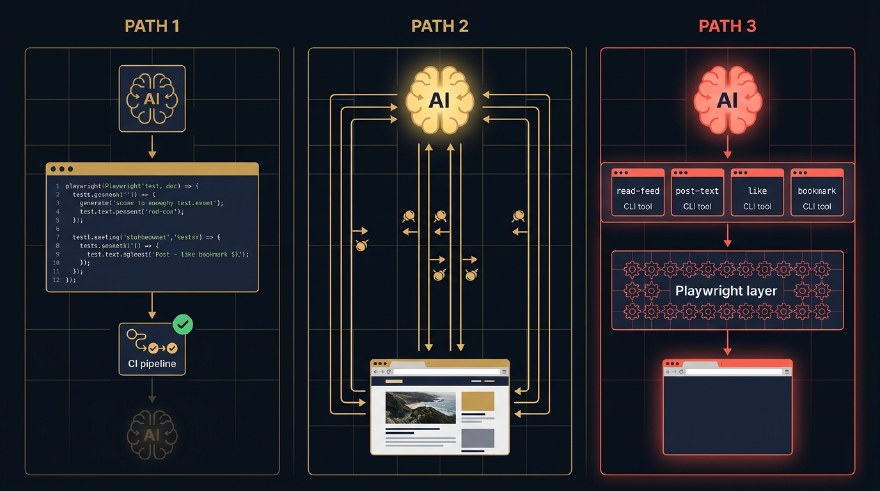
It is 2026, and there are three ways an AI agent drives a browser. They look similar from the outside. They share buzzwords. The vendor pitch decks lump them together as “AI-powered automation.”
They are not the same thing.
If you write tests for a living, automate workflows, or are trying to figure out where your tooling budget should go, picking the wrong one is going to cost you. Latency. Reliability. Money. Your weekend.
I have shipped all three in the last twelve months. One of them is the one I now reach for by default. This post is the case for it, with the honest tradeoffs of the other two.
The three paths
graph TB
    Author["You
the author of an agent"] --> P1["Path 1
AI-generated code"]
    Author --> P2["Path 2
Live driving"]
    Author --> P3["Path 3
Composed Tools"]
    P1 --> R1["Raw Playwright/Selenium code,
authored by an AI agent,
committed and run by CI"]
    P2 --> R2["LLM + Playwright MCP or CLI,
generates code on the fly,
uses and throws away"]
    P3 --> R3["LLM + your atomic tools
(CLI, functions, BDD steps),
composes workflows"]
    style P3 fill:#FF5A4E,stroke:#FF5A4E,color:#0B0F14
    style Author fill:#F5F0E8,stroke:#5A544B,color:#0B0F14
    style P1 fill:#F5F0E8,stroke:#FFB020,color:#0B0F14
    style P2 fill:#F5F0E8,stroke:#FFB020,color:#0B0F14
    style R1 fill:#F5F0E8,stroke:#5A544B,color:#0B0F14
    style R2 fill:#F5F0E8,stroke:#5A544B,color:#0B0F14
    style R3 fill:#F5F0E8,stroke:#5A544B,color:#0B0F14
The first path is AI-generated code. You ask an AI coding agent (Cursor, Claude Code, Copilot) to write a Playwright or Selenium test for you. You commit the code. CI runs it. The LLM was at authoring time, not run time. Once the file is checked in, no AI is involved when the test executes. (To be clear: this is not Playwright’s built-in playwright codegen recorder, which captures your manual clicks. This is an agent writing the same raw code a human engineer would write, just faster.)
The second path is live driving. The LLM drives the browser in real time. It takes a snapshot of the page, decides what to do, generates a Playwright instruction, runs it, throws the code away, takes another snapshot, decides again. Every step is an LLM call. The plumbing can be MCP-shaped (Playwright MCP, Stagehand, Browser Use) or CLI-shaped (Playwright CLI behind a shell tool). Either way, the defining trait is the same: code is generated on the fly and discarded.
The third path is composed tools. You pre-build a set of deterministic atomic operations. read-feed. post-text. bookmark. Each one is a small Playwright function exposed through whatever wrapper your stack prefers, a CLI command, a Python function, a Cucumber step, an RPC endpoint. The LLM does not click anything. It composes these tools into workflows. This is the pattern behind Sathi, the private agent I built that now drives my LinkedIn, X, and Reddit on a single Mac mini in the corner.
Three paths. Same destination. Wildly different bills.
| Path | What runs at execution time | Tokens per task | Latency | Reliability |
|---|---|---|---|---|
| AI-generated code | Static code, no LLM | 0 | Fast | Medium |
| Live driving | LLM + MCP/CLI, code on the fly | High | Slow | Medium |
| Composed tools | LLM + your atomic tools | Low | Fast | High |
The numbers in that table are not opinions. They fall out of the architecture. Let me walk each path in turn.
Path 1: AI-generated code
This is the path most teams are already on, often without naming it. You open Cursor or Claude Code. You describe a flow. “Write a Playwright test that logs in as admin, creates a project, invites a user, and asserts the user appears in the project member list.” The agent hands you a file. You commit it. Done.
The first thing to clear up: this is not Playwright’s npx playwright codegen recorder. That tool watches you click around and emits code from your actions. Path 1 is the opposite. There is no recording. An AI coding agent writes raw Playwright or Selenium from scratch, the same kind of code a human engineer writes by hand. You are using AI to expedite a human authoring task, not to replace the structure of that task.
The second thing to clear up: this is not as easy as it looks in a demo. Generating one passing test from a one-shot prompt is a parlour trick. Generating a maintainable suite that survives six months of UI churn is a real engineering discipline. Selectors have to be resilient. Page objects have to be factored. Test data has to be isolated. Failure modes have to be diagnosable. You only get there by nailing the agentic engineering practices around the agent: tight prompts, the right context (style guides, prior tests, test-id conventions), structured review loops, evals on the generated output, retry strategies, and clean handoffs between authoring and maintenance. A casual prompt produces casual code, and casual code becomes someone’s weekend in three months.
Pros, when you do this well, are exactly what you would expect. The test runs in CI. No LLM at run time, so no token cost, no latency tax, no model-of-the-day flakiness. You can review the diff. Your test is auditable code that any engineer on the team can read.
Cons are also what you would expect. The LLM saw your DOM at authoring time and pinned its selectors to it. Three weeks later marketing reskins the navbar and the test fails. Layout drift, copy change, A/B test, localisation, all of it breaks the test. None of those are application bugs. Your CI inbox does not care about that distinction.
You can mitigate. Stable data-testid attributes. Resilient locators. Keep the agent in the loop on test maintenance, not just authoring. But you are still on Path 1. The AI is helping you write code that will go stale faster than the code it is testing.
This path is the right call when:
- The UI is stable and changes through deliberate releases.
- The test suite runs in CI and you want zero ambiguity in the verdict.
- You want the test artifact to be a code review object, not a model output.
- Your team has the discipline to treat AI-generated tests as real code, not throwaway output.
If you are a regulated team, or you ship into compliance, or your test failures need to point at a line of code, Path 1 is still the right primitive. The agent is your typist, not your runner.
Path 2: live driving (MCP or CLI)
This is the loudest path in the demos right now, and the most seductive. You install Playwright MCP, or wire up the Playwright CLI behind a shell tool. You point your agent at a page. You write a prompt in plain English. “Find the cheapest direct flight from Singapore to Tokyo on the 14th.” The agent screenshots the page. Identifies the search box. Types. Clicks. Reads the results. Picks one. It feels like magic. Your English just turned into UI actions in real time, no scripts in the middle.
That feeling is exactly the trap.
Under the hood, this is use-and-throw code generation. The agent is generating tiny snippets of Playwright on the fly, executing them once, and discarding them. The plumbing detail (MCP server vs CLI subprocess) is a wrapper choice. Playwright ships both. Either way, the LLM is the driver, and every action goes through the model.
graph LR
    U["User
plain English"] --> A["LLM Agent"]
    A <-->|"loop:
snapshot, think, type, click
30 to 100 round trips"| M["Playwright MCP or CLI"]
    M -->|"generated code,
used and thrown"| B["Browser"]
    B -->|"DOM, screenshot,
or accessibility tree"| M
    A -.->|"every step =
1 model call"| C["token meter
spinning fast"]
    style A fill:#FFB020,stroke:#FFB020,color:#0B0F14
    style C fill:#FF5A4E,stroke:#FF5A4E,color:#0B0F14
    style U fill:#F5F0E8,stroke:#5A544B,color:#0B0F14
    style M fill:#F5F0E8,stroke:#5A544B,color:#0B0F14
    style B fill:#F5F0E8,stroke:#5A544B,color:#0B0F14
A simple flow that an experienced human does in eight clicks turns into 30 to 100 LLM round trips. The LLM is doing the cognitive work and the motor work. Every click is preceded by a thought, and every thought costs tokens.
This whole approach is also highly probabilistic. With a strong frontier model on a clean site, it usually works. With a weaker model, a complex site, or an edge case the model has not seen, it often does not. Run the same prompt twice and you can get two different paths through the UI, or a success and a failure for no obvious reason. The “magic” is the part that hides this from you on the happy path. On the unhappy path, the same magic just becomes an expensive shrug.
Pros are real. The agent recovers. If a popup appears, it dismisses it. If the layout shifts, it adapts. If the site asks an unexpected question, the LLM negotiates. For exploratory tasks on unfamiliar sites, this is the only path that works at all.
Cons are also real, and they compound at scale.
Token cost. A single end-to-end booking flow on a major airline burned around 240,000 input tokens and 12,000 output tokens for me last month. That is roughly sixty cents on Sonnet 4.6, three dollars on Opus. Run that 1,000 times in your test pipeline, do the math, ask your CFO.
Latency. Snapshots are slow. Model calls are slow. Even on the fastest setup, a multi-step flow takes 30 to 90 seconds. A flow your Path 1 test runs in 4 seconds takes a minute.
Non-determinism. Run the same prompt twice. The agent picks different buttons. Different paths. Sometimes it clicks the right thing. Sometimes it does not. You cannot tell if a “failure” is a real bug or the agent having a bad day.
Auditability. A reviewer who needs to understand what your test is checking has to read a 60-step trace of LLM thoughts and tool calls. Compare that to a 30-line Playwright file.
This path is the right call when:
- You are doing exploratory work or one-off automation.
- The site is novel and you do not know its structure.
- You have a budget for tokens and you do not need determinism.
It is the wrong call for production workloads that run a thousand times a day. Letting the LLM click is letting the most expensive cognitive process in your stack do the cheapest motor work. You are using a Ferrari to drive groceries home.
Path 3: composed tools
The third path is built on a single principle.
Push as much determinism into pre-built tools as you can. Then let the LLM compose them.
The “tool” can be whatever shape your stack prefers. A CLI command. A Python function inside a LangChain agent. A Cucumber step inside a BDD framework. A gRPC endpoint across a service boundary. A Make target. The form does not matter. The contract does. Each tool does exactly one thing, predictably, with a stable signature and a stable result. The LLM does not see the DOM, the snapshot, or the click. It sees a tool name and a structured response.
For my own agentic workflows on LinkedIn, X, and Reddit, I built this as a CLI called Sathi. The repo is private for now, so there is no link to drop, but the architecture is reproducible from this post alone. CLI was the right wrapper for me because shell-out is the lowest-friction tool surface for any modern LLM. Every model knows how to call a subprocess and parse JSON. But the same pattern works as Python functions, Cucumber steps, or RPC endpoints. Pick the wrapper that fits where the orchestrator already lives.
What stays the same across all those wrappers is the atomic-operations list. Sit down once, ahead of time, and identify the operations a workflow on your target site actually needs. For LinkedIn, mine is short.
read-feed, return the latest N posts as JSON.read-notifications, return the unread notifications.read-messages, return the unread DMs.post-text, publish a text post.reply-to-comment, reply on a specific comment thread.send-dm, send a direct message.like, like a specific post by URL.
Each of these is a deterministic Playwright function. You write it once, you debug it once, you maintain it like any other piece of code. It uses real selectors, real waits, real assertions. When LinkedIn changes its DOM, you fix the selector in one place.
Then you wrap each one as a CLI command.
$ sathi linkedin read-feed --limit 20
[
  { "author": "Marc Benioff", "text": "...", "url": "..." },
  { "author": "Naval", "text": "...", "url": "..." },
  ...
]

$ sathi linkedin post-text --file ./draft.md
{ "ok": true, "url": "https://linkedin.com/posts/sahajamit_..." }
Now the LLM enters the picture. It does not click anything. It does not snapshot the DOM. It composes.
graph LR
    A["LLM Agent"] -- "1. shell call" --> T1["sathi linkedin read-feed"]
    A -- "2. shell call" --> T2["sathi linkedin reply-to-comment"]
    A -- "3. shell call" --> T3["sathi x post-thread"]
    T1 --> P["Playwright
deterministic"]
    T2 --> P
    T3 --> P
    P --> B["Browser tab,
already logged in"]
    style A fill:#FF5A4E,stroke:#FF5A4E,color:#0B0F14
    style T1 fill:#F5F0E8,stroke:#FFB020,color:#0B0F14
    style T2 fill:#F5F0E8,stroke:#FFB020,color:#0B0F14
    style T3 fill:#F5F0E8,stroke:#FFB020,color:#0B0F14
    style P fill:#F5F0E8,stroke:#5A544B,color:#0B0F14
    style B fill:#F5F0E8,stroke:#5A544B,color:#0B0F14
To ask the agent to “reply thoughtfully to anyone who commented on my latest post in the last hour” the loop is roughly three CLI calls. Read recent comments. Pass them to the LLM as text. The LLM drafts replies. Send the replies. The browser is open the entire time, but the LLM never sees a pixel of it.
Pros stack up.
Cheap. A workflow that costs fifty cents on Path 2 costs less than a cent on Path 3, because the LLM only sees the JSON output of the atomic tools, not the rendered page.
Fast. A 30-second Path 2 task runs in 2 to 5 seconds on Path 3, because each atomic tool is pure Playwright, optimised, no model in the loop.
Reliable. Atomic tools are unit-testable in isolation. Selector breakage is a single-tool problem, not a workflow-wide flake. When LinkedIn changes its post button, you fix post-text and every workflow that uses it is back online.
Self-healing, almost for free. This is the part that surprised me, and it is the strongest argument for Path 3 over Path 1.
When a deterministic tool fails, it fails loudly, with a structured error: “could not find element matching [data-testid='compose-trigger'] on page after 5s.” That error goes back to the orchestration LLM. The LLM has options. It can re-snapshot the live DOM, find the new selector itself, and propose a patch to the tool definition, which I either auto-merge in dev or queue for review in production. It can fall back to Path 2 (live driving) for that one operation while flagging the broken tool for maintenance. Or it can refuse the workflow with a rich diagnostic that points at the exact selector that drifted.
Compare that to the alternatives. Path 1 fails the whole CI run on a selector change and leaves a human to read the diff. Path 2 might just click the wrong thing and confidently report success, because the LLM thought a similar-looking button was the right one. Path 3 is the only one of the three where the agent both notices the breakage and can do something about it. Self-healing is not a separate feature you bolt on. It falls out of the architecture, because the LLM is already in the loop, just one rung up from the broken tool.
Auditable. The trace is a list of CLI calls. Easy to read, easy to log, easy to replay. Compliance teams understand it. Engineers understand it.
Composable across apps. Sathi opens one browser tab per app, so LinkedIn, X, and Reddit can be driven in parallel. The agent can read a comment thread on LinkedIn, draft a reply, post a related quote on X, then bookmark a referenced post. Three apps, four tools, one orchestration prompt.
Cons are the price of admission.
You have to build the tools first. No magic discovery. Each atomic operation is code you wrote. If your site has 200 surfaces and you need agentic coverage of all of them, that is real engineering, not a one-day spike.
Coverage is bounded. The agent can only do what the atomic tools allow. If the user asks for something the tool surface does not support, the agent has to refuse or fall back to Path 2. There is no graceful degradation in between.
Up-front design tax. What is an atomic operation? Where do you draw the boundary? Too granular and you are reinventing the DOM. Too coarse and the LLM cannot compose. The right grain is workflow-shaped, not page-shaped, and finding it takes a few iterations.
These are the right tradeoffs for production. You are building durable infrastructure, not summoning behaviour from a snapshot.
The math, side by side
Numbers from real workloads I have run over the past quarter, on Sathi vs. an equivalent Playwright MCP setup.
| Workload | Path 1 (AI-generated) | Path 2 (live driving) | Path 3 (composed) |
|---|---|---|---|
| Read 20 LinkedIn posts | n/a | 18s, $0.15 | 2.1s, ~$0.001 |
| Reply to 5 LinkedIn DMs | n/a | 95s, $0.62 | 6.4s, ~$0.004 |
| Post a thread on X | n/a | 42s, $0.30 | 3.2s, ~$0.002 |
| Cross-post (LI + X + Reddit) | n/a | 2m 15s, $0.85 | 4.8s, ~$0.005 |
| Login flow assertion in CI | 4.1s, $0 | 38s, $0.20 | 1.9s, $0 |
Path 1 wins on the assertion test, because no LLM in the loop is the cheapest possible option. Path 3 wins on every workflow that needs to do something agentic. Path 2 is rarely the answer once a workload becomes routine.
The LLM should be deciding, not clicking. Mix the two roles up and the bill arrives in three forms: latency, money, and bugs.
What this means for QA
If you write tests for a living, this is the section that matters.
The instinct of QA teams in 2024 and 2025 was to chase Path 2. Plug Playwright MCP into your test runner. Tell the agent in plain English what to verify. Let the model figure out the clicks. The pitch was robustness. The reality was a CI bill that grew faster than the codebase, runs that took ten times as long, and pass-fail verdicts that needed a model trace to interpret.
The 2026 instinct should be different. Pick a path per workload, not per team.
For functional regressions in stable flows, stay on Path 1. AI-generated code plus stable selectors plus visual snapshots is still the most economical way to assert “this checkout flow still works.” Use the LLM to write and maintain those tests, not run them.
For exploratory coverage, use Path 2. When a designer ships a new page and you want fast smoke coverage before you write a deterministic test, ten minutes with Playwright MCP earns its keep.
For workflow-shaped automation, build Path 3. Anything that needs to run hundreds or thousands of times a week, that touches multiple apps, that has compliance or audit needs, belongs in atomic tools. This is most of your production agent surface. Build it like infrastructure.
The skill set that compounds is the third one. Designing the atomic tool boundary. Writing the deterministic code underneath. Wrapping it in whatever interface your orchestrator speaks: a CLI, a function, a BDD step. The QA professionals who learn this in the next two years are going to be the people writing the agentic test infrastructure for the next decade.
The connection to Web MCP
Sharp readers of my last post will notice something. Path 3 is just Web MCP that you build for yourself, when the site you are automating does not yet expose its own.
Web MCP says, the page exposes a tool surface, the agent calls tools, no DOM in the middle. Sathi says exactly the same thing. The only difference is that LinkedIn does not (yet) ship a navigator.modelContext with postText in it. So I built one on the outside, in Playwright, behind a CLI.
When sites adopt Web MCP, the Playwright underneath my atomic tools goes away. The CLI surface stays. The orchestration logic stays. The skill of designing the right tool boundary is the same.
That is not a coincidence. The shape of agent-friendly automation is converging on tools, on both sides of the screen. The pixels are the legacy interface. The tools are the future.
Pick the path the workload asks for
There is no single right answer. There is a right answer per workload.
If you remember one thing, remember this. The LLM should decide. The tool should act. As soon as the LLM is doing the acting, you are paying for it in latency, money, and reliability.
AI-generated code. Live driving. Composed tools. Three paths. Pick the one the workload is asking for, not the one your favourite vendor is selling.
The composed-tools path is the one I would bet on for production agentic workflows over the next two years. It is more work up front. It pays for itself by the second time the workflow runs.
This is a long-form companion to my work on Sathi CLI, the agent that drives my LinkedIn, X, and Reddit on a single Mac mini. If you want the full story, including the architecture and the cost numbers in more detail, subscribe to The Agentic Engineer on YouTube. The Sathi episode is the next one up.