Every Web Page Is Becoming a Function Call
Companion essay to Episode 03 of The Agentic Engineer. Web MCP, A2A, UCP, and a working bank you can clone tonight. The new browser primitive that quietly changes what UI automation means.
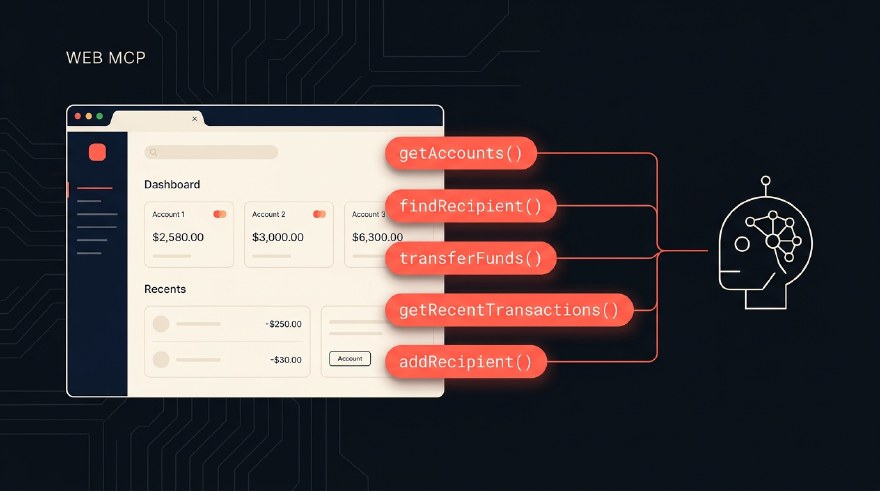
There is a quiet shift happening in the web platform. It does not have a launch event. It has not made the front page of Hacker News. But if you build websites, write tests, or care where the AI agent stack is going, it is the most consequential thing happening in browsers in 2026.
Three protocols are landing at once. Web MCP in Chrome 146. A2A under the Linux Foundation. UCP in Google Merchant Center. Different teams, different surfaces, but the same thesis underneath all three.
Every web page is becoming a function call.
This post is the long-form companion to Episode 03 of The Agentic Engineer. The video does the 11-minute walkthrough. This post does the deep-dive, with the working code from the AcmeBank demo I built so you can play with the new primitive tonight.
The Salesforce signal
A few weeks ago, Marc Benioff posted this on X.
Welcome Salesforce Headless 360. No browser required. Our API is the UI. The entire Salesforce, Agentforce, and Slack platforms are now exposed as APIs, MCP tools, and CLI commands.
Five point six million views. Six thousand likes. The numbers are not what matters. The framing is what matters.
What he is telling you, between the lines, is that the UI is no longer the product. The agent is the user. The API is the surface. If your career is built on UI automation, or your company sells testing tools that read pixels and click buttons, the shift is already here. Sixty new MCP tools shipped at launch, every Agentforce, Slack, and core Salesforce surface, callable from any agent. ServiceNow, SAP, Workday, the rest of the enterprise stack is right behind.
That is the macro signal. Now zoom in on the browser, where Web MCP is doing the same thing one page at a time.
The thesis: every page becomes a function call
Today, when an AI agent visits a website, it has two ways to act.
The first is vision. The agent screenshots the page, sends it to a vision model, and guesses where to click. ChatGPT Atlas works this way. So does Anthropic’s computer-use mode. It works, and it is breathtaking when it works, but it is slow, expensive, and brittle. A misread pixel and you are clicking the wrong button.
The second is the DOM. The agent takes a snapshot of the page’s HTML, hands it to Playwright MCP or the Playwright CLI, and drives the UI step by step, button by button, the same way a human-script-writer would. Better than vision, still slow, still brittle. Selectors break. Layouts shift. Localisations drift.
Both treat the website as opaque. The agent is on the outside, peering in.
Web MCP turns that around. The website declares its tools. searchFlights. addToCart. transferFunds. The agent calls them directly, the same way you call a function in code. No DOM hunt. No screenshot. No guesswork.
graph LR
    A[AI Agent] -- "calls
transferFunds(args)" --> B[Web Page]
    B -- "registers tools via
navigator.modelContext" --> A
    B -- "structured JSON result" --> A
    style A fill:#FF5A4E,stroke:#FF5A4E,color:#0B0F14
    style B fill:#131316,stroke:#FFB020,color:#F5F0E8
This is the whole pitch in one diagram. The agent and the page have a contract. The contract is the tool surface.
Web MCP basics
Web MCP is a new browser API, co-built by Google and Microsoft, and shipping today in Chrome 146 behind a flag. The spec is a W3C Web Machine Learning Community Group draft.
It introduces one new global on every page: navigator.modelContext.
The website calls registerTool, gives it a name, a description, a JSON schema for the inputs, and a function that executes when the agent invokes it. That is the entire API. Three methods (registerTool, unregisterTool, listTools), one contract per tool.
There are two flavours.
Declarative. Special attributes on plain HTML forms. Zero JavaScript needed. The browser reads the form, derives the schema, and exposes it.
Imperative. JavaScript, dynamic, lifecycle aware. You register tools when a component mounts and unregister when it unmounts. Tools come and go as the user navigates. This is where things get interesting.
Here is the imperative version, in roughly the shape AcmeBank uses:
navigator.modelContext.registerTool({
  name: 'getAccounts',
  description: "List the user's bank accounts with current balances.",
  inputSchema: { type: 'object', properties: {} },
  async execute() {
    const accounts = bankStore.listAccounts();
    return {
      content: [{
        type: 'text',
        text: formatAccountList(accounts),
      }],
    };
  },
});
The agent visits the page, calls listTools(), sees getAccounts in the list, calls executeTool('getAccounts', '{}'), and gets a structured response back. No DOM. No screenshot.
Contextual tools: the part that surprised me
Here is the part of the spec that took me a moment to internalise.
The tools are scoped to the page the user is on, not the website as a whole.
The flight search page exposes searchFlights. Move to the results page and searchFlights goes away. setFilter and listFlights show up instead. The agent re-discovers the tools every time the user navigates. The page state and the tool surface stay in sync.
No stale catalog. No global registry. No version drift between server-side schema and client-side reality.
graph TD
    Home["/ home"]:::route --> AccountsView["Tools: getAccounts
findRecipient
getRecentTransactions"]
    Transfer["/transfer page"]:::route --> TransferView["Tools: getAccounts
findRecipient
getRecentTransactions
+ transferFunds"]
    Recipients["/recipients page"]:::route --> RecipientsView["Tools: getAccounts
findRecipient
getRecentTransactions
+ addRecipient"]
    classDef route fill:#FF5A4E,stroke:#FF5A4E,color:#0B0F14
Every web page becomes its own tiny MCP server, with exactly the tools the user needs in that moment. Server-side MCP cannot do this. It does not know which page the user is on. Only the page itself does.
A working bank you can run tonight
Theory is cheap. Let me show you a working example.
I built AcmeBank as the smallest interesting Web MCP demo I could ship. A tiny fake banking app, fully Web MCP enabled, ~600 lines of React and TypeScript, public on GitHub.
Five tools, deliberately chosen.
| Tool | Scope | Read or write | Confirm modal |
|---|---|---|---|
getAccounts |
Global | Read | No |
getRecentTransactions |
Global | Read | No |
findRecipient |
Global | Read | No |
transferFunds |
/transfer page only |
Write | Yes |
addRecipient |
/recipients page only |
Write | Yes |
Three read-only tools registered for the whole app at boot. Two sensitive tools that only register when the user navigates to the page where they make sense, and pop a native confirm modal before any state changes.
There are three patterns inside that you can lift directly into your own site.
Pattern 1: per-page tool registration via React lifecycle
// src/mcp/useTool.ts
export function useTool(tool: ToolDescriptor) {
  useEffect(() => {
    navigator.modelContext.registerTool(tool);
    return () => navigator.modelContext.unregisterTool(tool.name);
  }, [tool.name]);
}
Used inside a page component:
// src/pages/Transfer.tsx
const transferTool = useMemo(() => makeTransferFundsTool(), []);
useTool(transferTool);
When the user navigates away, React unmounts the page, the cleanup callback runs, the tool unregisters. The agent’s tool list shrinks. That is contextual MCP working with zero ceremony, expressed in the framework you already use.
Pattern 2: confirm-before-act with requestUserInteraction
The headline pattern. The thing that makes Web MCP safe to put in front of money.
const approved = await agent.requestUserInteraction(async () => {
  return agentConfirm({
    title: 'Approve transfer?',
    details: [
      { label: 'From',   value: from.nickname },
      { label: 'To',     value: toLabel },
      { label: 'Amount', value: fmtSGD(amountCents) },
    ],
  });
});

if (!approved) {
  return {
    content: [{ type: 'text', text: 'Transfer cancelled by user. No money moved.' }],
    isError: true,
  };
}

// only here does the actual transfer execute
The agent calls the tool. Control flows into your execute. You pause on requestUserInteraction. The user sees a real native modal, decides, and only then does the tool resolve. The agent cannot bypass the modal. The user is always in the loop for sensitive actions.
Pattern 3: tagging agent-initiated state changes
Every transaction in AcmeBank stores channel: 'ui' | 'agent'. The UI shows a coral “via agent” tag on rows the agent created.
It matters for two reasons. Auditability, because users want to know what their agent did on their behalf. And clarity, because in a few years your support ticket queue will be full of “I did not authorise this” disputes, and you will want a clean answer.
How to actually run it
git clone https://github.com/sahajamit/webmcp-acmebank-demo.git
cd webmcp-acmebank-demo
npm install
npm run dev
Open http://localhost:5173 in any modern browser. The polyfill (@mcp-b/webmcp-polyfill) wires up navigator.modelContext even without Chrome Canary, so you can try the tools directly from DevTools console:
// What tools is the page exposing right now?
navigator.modelContextTesting.listTools().map(t => t.name);
// → ["getAccounts", "getRecentTransactions", "findRecipient"]

// Call one
const result = await navigator.modelContextTesting.executeTool(
  'getAccounts', '{}'
);
console.log(JSON.parse(result));

// Navigate to /transfer in the app, then run listTools() again.
// "transferFunds" appears.
The fastest way to internalise tool contracts is to register one and watch it fire.
If you want the full picture with the sidebar WebMCP Tool Inspector (a Chrome DevTools-style panel that shows every tool the page exposes, lets you execute them with custom args, and watches the responses), the README has the 5-minute Chrome Canary setup.
The rest of the stack: A2A and UCP
Web MCP at the edge is one piece. Two more protocols sit underneath, completing the agent’s internet.
A2A is the Agent-to-Agent protocol. It lets two agents, built by different teams, on different stacks, in different languages, find each other and exchange work. Google announced it last year. By early 2026, it crossed 150 organisations: AWS, Cisco, IBM, Microsoft, Salesforce, SAP, ServiceNow. It is now governed by the Linux Foundation. Version 1.2 ships signed agent cards, so a receiving agent can cryptographically verify the sender. No more agent identity theft.
UCP is the Universal Commerce Protocol. The open standard for agents to transact on a user’s behalf. Announced by Google at the National Retail Federation conference in January, live in Merchant Center the same month. Shopify, Etsy, Wayfair, Target, Walmart, twenty-plus global partners at launch. A merchant integrates two ways. Native checkout, where the agent completes the purchase right inside Google AI Mode or Gemini, no redirects. Or embedded checkout, an iframe for more complex flows like a multi-item travel booking. Critically, UCP speaks A2A and Web MCP natively, so it slots into the rest of the stack without glue code. And the boundary holds: the merchant stays the merchant of record. The customer relationship, the loyalty data, the post-purchase support, all yours.
Line them all up and you get this.
graph TB
    User((User)) --> Agent[AI Agent in browser
Claude · Atlas · Comet · Copilot]
    Agent -- "Web MCP
(per-page tools)" --> Page[Web pages]
    Agent -- "A2A
(agent-to-agent)" --> OtherAgent[Other agents
signed cards]
    Agent -- "UCP
(commerce)" --> Merchant[Merchants
Shopify · Etsy · Walmart]
    Page -. backed by .-> Backend[Headless backends
Salesforce 360 · ServiceNow · SAP]
    Merchant -. backed by .-> Backend
    style Agent fill:#FF5A4E,stroke:#FF5A4E,color:#0B0F14
    style Page fill:#131316,stroke:#FFB020,color:#F5F0E8
    style OtherAgent fill:#131316,stroke:#FFB020,color:#F5F0E8
    style Merchant fill:#131316,stroke:#FFB020,color:#F5F0E8
    style Backend fill:#08080A,stroke:#5A544B,color:#A9A196
This is the agent’s internet. It is being built right now. And honestly, it is not really for us. It is for the thing that browses on our behalf.
What this means for QA
If you write tests for a living, this section is the one that pays for the rest.
Today, asserting “the user’s checking balance is $482.35” in a browser test means going through the DOM.
// Playwright-style, coupled to markup, fragile
const balance = await page
  .locator('.card.checking .balance')
  .textContent();
expect(balance).toBe('$482.35');
Three things break this assertion. Someone renames .card to .account-tile. Someone tweaks the markup of .balance. Someone localises "checking" to "Checking". None of these are bugs in the application. They are cosmetic UI churn. But your test treats them as failures, because a DOM-shaped contract conflates “the value the app believes is the balance” with “the way the balance is currently rendered today.”
With Web MCP, the same assertion goes around the DOM entirely.
// One call, structured result, survives any UI refactor
const result = await page.evaluate(async () => {
  const raw = await navigator.modelContextTesting.executeTool(
    'getAccounts', '{}'
  );
  return JSON.parse(raw);
});

expect(result.content[0].text).toContain('Everyday Checking');
expect(result.content[0].text).toContain('$482.35');
The page is now exposing a stable, contract-shaped surface for the same data that is painted on screen. If marketing reskins the account card from grey to coral, the test does not care. If engineering rewrites the dashboard in Solid instead of React, the test still passes. You are asserting against the application’s notion of the user’s accounts, which is what you wanted in the first place. The DOM was just the only handle you had.
Layout regressions become visual tests. Functional regressions become contract tests. The two categories separate cleanly for the first time.
Three things you can start this week.
One. Run the demo. Clone the AcmeBank repo, fire up npm run dev, drive the tools from the DevTools console. Add a sixth tool of your own. The fastest way to internalise the new primitive is to ship one.
Two. Test agent behaviour, not just outcomes. When the agent has options, does it pick the right one. When the user’s mandate has limits, does it respect them. When prompted with a confusing tool description, does it ask for clarification. This is closer to fuzzing than traditional assertion. Property-based testing tools translate well.
Three. Build cross-protocol end-to-end tests. Web MCP into A2A into UCP. The bug is almost never in one layer. It is in how they hand off. Schema drift, identity-link mismatch, agent-card signature failure.
Selenium does not go away. It just moves up the stack.
Why this is a window
A few weeks ago, I posted about Chrome 146 on LinkedIn, and one line in that post is the line I keep coming back to.
The browser is not just a browser anymore. It is becoming an execution environment for agents.
The QA professionals who get good at testing inside that execution environment, writing tool-contract tests, verifying agent behaviour, watching cross-protocol end-to-end flows, are going to have a quiet but enormous advantage in two years.
Naval said it cleanly: AI is eating UI. The whole world of buttons, forms, and dashboards we built our digital lives on top of is getting replaced by agents that act on our behalf. Pretending it is not happening is a category error. So is panicking about it.
This is not a threat. It is a window.
The specs are still being written. The browser support is in canary. The tools are immature. Which means there is room. There is no expert yet.
The expert can be you.
If this was useful, the video version covers the same ground in 11 minutes, with slides for the protocol diagrams and live narration over the AcmeBank tour. Subscribe to The Agentic Engineer on YouTube for the next episode.