AI Is Downstream of Context
Why connected tools beat smarter models in AI testing. Same model, same prompt, one 5 KB skill file of difference: one agent wrote a test that would re-introduce a fixed production incident, the other caught the ambiguity before writing a single test. The full A/B evidence, the reverse-engineering loop for legacy products, and the build/store/surface playbook.
This post grew out of a talk I gave on the BrowserStack webinar. If you’d rather flip through the slides, view the live deck here.
Test cases generated in 12 seconds from any user story. Self-healing tests with 99.2 percent accuracy. Chat with your PRD, ninety percent faster authoring. Cut flaky tests by 87 percent, overnight.
That is what the AI-in-testing pitch sounds like in 2026. The demos are slick, the numbers are seductive, the pricing pages are ready. And honestly, on the demo apps they show you, these tools mostly do work. That is exactly what makes this hard.
This post is about the gap between those demos and your actual product, why that gap is not a model problem, and how to close it with a context layer you can build in about a week. I will show you a controlled A/B experiment where the same model, given the same prompt, produced a test plan with a confidently wrong test in one terminal and a senior-engineer-grade plan in the other. The entire difference was one 5 KB file.
The demos lie about your job
The reason vendor demos work is that the apps in them have no context to forget. A 3-page todo app. A login form. A bookstore. There is no domain knowledge, no legacy quirks, no 200-page requirements doc, no message bus, no five years of acceptance criteria buried in tickets.
The moment you point one of these tools at your actual product, the quality falls off a cliff. And the more enterprise the system, the steeper the cliff.
Because most QA teams do not work on the clean diagram in the architecture deck. You work on the other one.
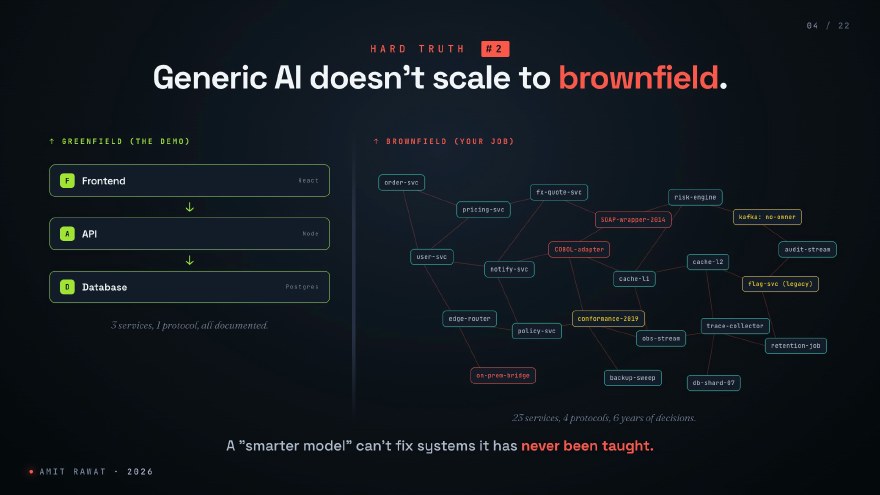
Twenty-plus microservices. A SOAP wrapper from 2014 that nobody touches. A COBOL adapter. A Kafka topic that someone set up before they left in 2022, and nobody owns it now. Behaviour that exists because of a regulatory ruling from 2019 that has never been written down anywhere.
A generic AI testing tool cannot help you here. Not because the model is stupid. Because the model has never been taught any of this.
It’s not the model. It’s the context.
Here is the diagnosis. The reason these tools fail is not that the models are not smart enough. GPT-class models, Claude-class models: they can absolutely write test cases, debug failures, plan releases. The raw capability is there, and it improves every quarter without you doing anything.
They fail because they operate without the context that makes the difference between a senior tester and an intern. The senior is not smarter than the intern. The senior knows things. What the team shipped, what broke last March, which ticket wording is a trap, which flaky test is flaky for a known reason.
AI is downstream of context.
That is the thesis. The rest of this post is a proof.
You already have a second brain. It just isn’t agent-readable.
Before going deeper into testing, step out of the QA frame for a moment, because the pattern is not actually about testing.
Andrej Karpathy has talked for a while about LLMs needing externalised memory: the model is the engine, but the useful part is everything you bolt to it. Tiago Forte popularised the phrase “second brain” for the same idea on the human side. Notes, references, the structured trail of what you have already figured out.
Look at any scale and you will find you already have one. You just have not built it for an agent to read.
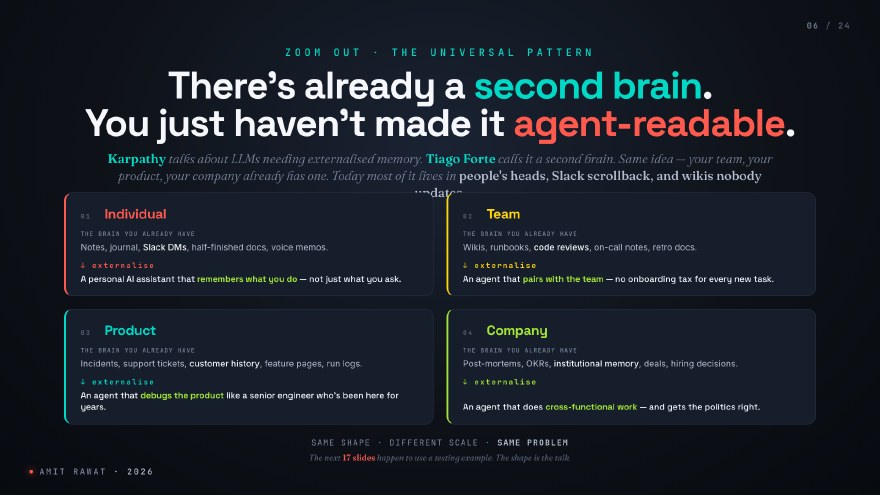
Individually, it is your notes, your Slack DMs, the half-finished docs. Externalise it and you get a personal assistant that remembers what you do, not just what you ask.
At the team level, it is wikis, runbooks, the comments on every code review. Externalise it and you get an agent that pairs with the team without an onboarding tax on every new task.
At the product level, it is incidents, support tickets, customer history. Externalise it and an agent debugs the product like the senior engineer who has been there for five years. This is the scale the rest of this post lives at.
At the company level, it is post-mortems, OKRs, institutional memory. Externalise it and you get an agent that can do cross-functional work and get the politics right.
Same shape. Different scale. Same problem. The rest of this post happens to use a testing example, because that is what I work on. The shape is the point.
The seven layers of testing context
When I say “context”, I do not mean “the prompt was too short”. I mean seven specific layers.
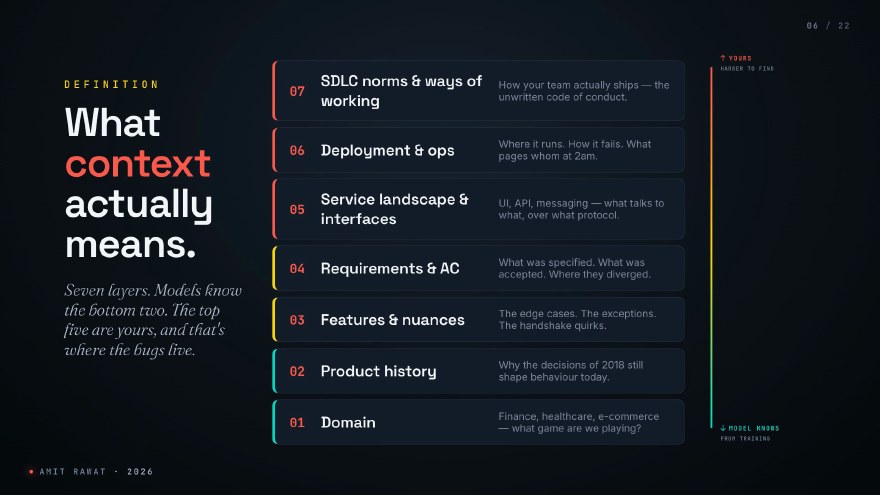
From the bottom up:
- Domain. Finance, healthcare, e-commerce. What game are we playing.
- Product history. Why the decisions of 2018 still shape behaviour today.
- Features and their nuances. The edge cases, the handshake quirks, the things only senior people on your team know.
- Requirements and acceptance criteria. What was specified, what was accepted, and where the two diverged.
- Service landscape and interfaces. UI, API, messaging. What talks to what, over what protocol.
- Deployment and ops. Where it runs, how it fails, what pages whom at 2am.
- SDLC norms and ways of working. How your team actually ships. The unwritten code of conduct.
Models know the bottom one or two from their training data. A frontier model has read more about e-commerce checkout flows than any human alive. But the top five layers are entirely yours. They exist nowhere in any training corpus.
The top five layers are where the bugs live.
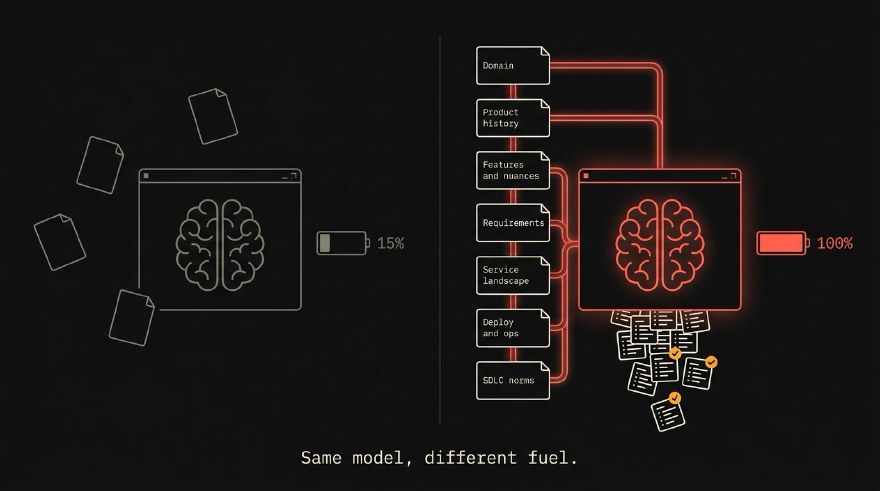
Running on 15% of a tank
Picture context as a fuel gauge. On the full end, your agent has all seven layers. On the empty end, just the user’s prompt and nothing else.
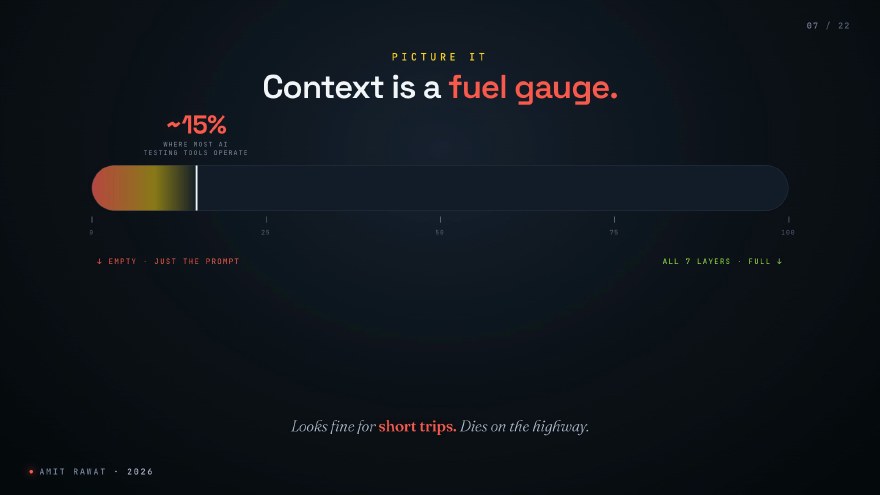
Most of the AI testing tools you will see at conferences run at about fifteen percent of a tank. They look fine for short trips. They die on the highway.
The proof: same model, same prompt, one 5 KB file of difference
Claims are cheap, so here is a controlled experiment. Everything in this section comes from real artifacts: two test plans generated on 2026-05-14, committed to a repo, analysed line by line.
The setup
The ticket is PROD-4830: send an email when an order ships. A feature every person reading this has received in their own inbox. No payments-domain priming required.
Two Claude Code sessions ran the same task:
| Session A (without skill) | Session B (with skill) | |
|---|---|---|
| Model | claude-opus-4-7 |
claude-opus-4-7 |
| Client | Claude Code CLI v2.1.140 | Claude Code CLI v2.1.140 |
| Machine | same laptop | same laptop |
| Prompt | identical | identical |
.claude/skills/qmd-kb/SKILL.md in working directory |
no | yes |
The skill file is about 5 KB of instructions. It tells the agent three things: a knowledge base of the product exists on this machine, here is how to query it through a CLI called qmd, and cite every non-obvious assertion you make.
One detail matters more than it looks: the qmd binary was on PATH in both sessions. The without-skill agent never invoked it, because nothing in its context said it existed. Capability was identical. Awareness was the only variable.
The numbers
| Metric | without skill | with skill |
|---|---|---|
| Test cases produced | 54 | 39 |
| File size | 12 KB | 18 KB |
| KB source citations | 0 | 50+ |
| Incident IDs referenced | 0 | 3 (INC-3045, INC-3088, INC-2891) |
| Known flake fingerprints referenced | 0 | 3 |
| Ticket ambiguity caught | no | yes, flagged pre-flight |
| Encoded an actual bug into a test | yes (TC-3.5) | no |
Note the first row. The without-skill plan has more test cases. If you judge test plans by counting them, the wrong one wins. More is not better; the with-skill plan packs 50 percent more content into 12 percent fewer lines, because every case is specific instead of padded.
The cost side:
| Metric | without skill | with skill | Multiplier |
|---|---|---|---|
| Total cost (USD) | $0.37 | $0.79 | 2.12x |
| API duration (model time) | 1m 46s | 3m 4s | 1.74x |
| Wall duration | 5m 13s | 5m 48s | basically equal |
| Cache reads | 48.1k | 253.8k | 5.28x |
The extra 78 seconds of model time is the agent looping back to the knowledge base six to eight times before writing a single line of the plan. The 5.28x cache-read multiplier is the expected shape of a KB-using agent: each qmd call pulls a few KB of grounded material into context, and every subsequent reasoning step re-reads it at the discounted cache rate. That discount is why total cost only doubled.
The headline finding: a confidently wrong test
Here is the moment the experiment stopped being about quality and started being about correctness.
The without-skill plan contains TC-3.5:
TC-3.5: Opt-out applies only to shipping updates, not other transactional mail. Intent: Regression. Don’t accidentally suppress
order placedordelivered. Assertions: Toggling “Shipping updates” suppresses only theshippedemail. Other transactional emails are still sent.
That looks completely reasonable. It even has the word “Regression” in it. A human reviewer skimming this PR would nod and approve.
Except this team had a production incident six weeks earlier, INC-3088, where customers unsubscribed from one email type and kept receiving others they expected to stop. The fix the team standardised on, documented in the knowledge base, says:
Unsubscribe is scoped at the category level, not the template level. Disabling
marketing_personalopts out ofabandoned_cartANDback_in_stockANDreview_prompt, and any future template added to that category. A new template added to the category creates a new row that defaults to enabled for every customer. Old unsubscribes don’t carry over to new templates. This is exactly the bug we just fixed.
The shipped email lives in the order_lifecycle category, alongside order_placed and delivered. Under the shipped contract, turning off “Shipping updates” suppresses all three. TC-3.5 asserts the exact opposite: the pre-INC-3088 broken contract, written into a fresh test, labelled as regression protection. If that plan merges and the test passes, the team has either built the wrong behaviour or enshrined drift between what the test asserts and what they intended. Either way, the INC-3088 complaint comes back in a new shape, and compliance eventually flags it.
The with-skill plan does the opposite twice over. First, it catches the trap before writing any tests, in a pre-flight section:
The ticket calls the toggle “Shipping updates” but the platform’s unsubscribe model is per-category, not per-template (this is the structural lesson of INC-3088). “Shipping updates” must map to either the existing
order_lifecyclecategory (which would also suppressorder_placedanddelivered) or a new sub-category. The plan below tests both interpretations; the failing cases tell the team which contract they actually shipped.
Then it writes TC-6.1, which tests the per-category invariant directly, including the most subtle part of the original regression: a hypothetical future template added to order_lifecycle must also be suppressed for a customer who already opted out. It even pins the API contract: the preference write goes through /api/v2/notification-preferences with body (category, enabled), never (template_id, enabled).
That pre-flight paragraph is what a senior team member’s contribution looks like. Caught the ambiguity, asked the right question, then wrote defensible tests for both possible answers.
Not knowing your codebase doesn’t just produce less-good tests. It produces confidently wrong tests.
The without-skill agent was not careless. It produced something that looks perfectly reasonable from outside the team. The problem is that being senior on a team means knowing the things that are not in the ticket.
Depth, breadth, and knowing what you don’t know
Two more contrasts from the same pair of files, compressed.
Replay protection. The without-skill plan tests “send the same webhook twice, get one email”. Generic, and not wrong. The with-skill plan names INC-3045 (the duplicate-shipped-emails incident that hit 1,200 customers in March), specifies the dedupe-key triple (template_id, recipient_hash, event_id), and tests six replay intervals: 1 ms, 10 s, 60 s, 5 min, 1 h, 23 h. Those are the exact intervals from the regression suite the team committed after the incident. It also adds TC-3.4: if the dedupe store itself is down, fail loud with a bounded delay queue, never fail open and double-send.
Epistemic honesty. The with-skill plan twice declares the boundary of its knowledge: “KB has no dedicated entry on email accessibility, treating this as new surface area” and “KB does not enumerate signature mechanics for the carrier integration, confirm with the team whether HMAC, mTLS, or carrier-issued JWT is in use.” The without-skill plan does the opposite: its TC-7.7 confidently asserts that tracking URLs are validated against an allowlist. Plausible policy. The team may never have implemented it. The agent invented a contract and then asked QA to verify it.
For test work specifically, “I don’t know, here’s what I do know” beats “here’s what’s probably true” every single time.
An honest reading of the full comparison: neither plan dominates. The without-skill plan has genuine breadth the KB does not cover, like migration safety, ESP rate-limit headroom, and zoom-to-200-percent accessibility. A production team would merge both. The knowledge base does not make the agent omniscient. It makes the agent stop inventing things that are not true.
Which brings the economics down to one sentence. The grounded plan cost $0.79, the ungrounded one $0.37, and the ungrounded one wrote a test that would have re-introduced a fixed incident. Forty-two cents to avoid shipping that test is a one-bug payback, every time.
The knowledge exists. It just isn’t reachable.
At this point the standard objection arrives: we have docs! We have a Confluence!
Sure. So does everyone. The knowledge exists, in three places.
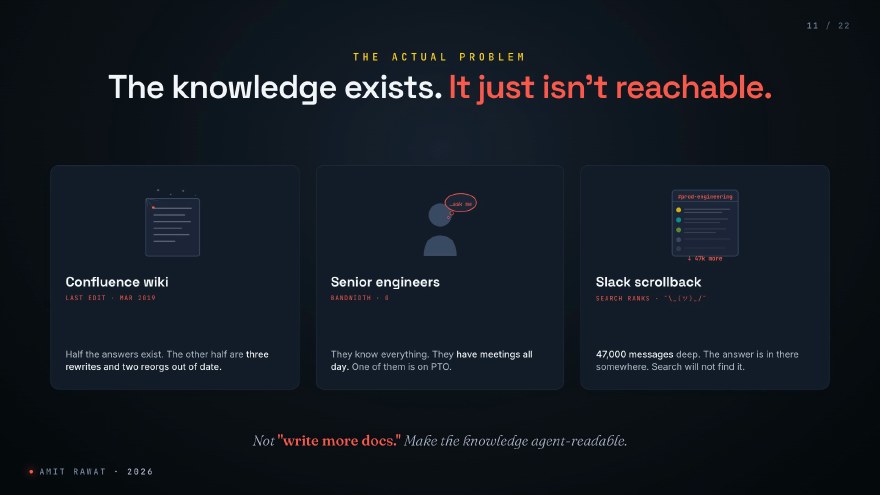
Rotting wikis: last edit March 2019, half the answers right, the other half three rewrites and two reorgs out of date. Tribal knowledge: the four senior engineers who actually know what is going on, with zero bandwidth, one of them on PTO. And 47,000 messages in a Slack channel called #prod-engineering. The answer is in there somewhere. Slack search will not find it.
None of these are reachable by an agent. That is the actual problem to solve. Not “write more docs”. Make the knowledge agent-readable.
The rest of this post is the playbook: build it, store it, surface it.
Build it: a knowledge base for a 20-microservice legacy product, without writing a doc by hand
Real example, from my own work. Last quarter I had to build context for an AI agent against a 20-plus-microservice legacy enterprise product. Years of features. Almost no docs. The team that built the original modules is mostly gone. I had to make the agent useful in three weeks, and I did not have three weeks to write documentation.
So I did not write any. I had the AI build its own knowledge base. By experience, not by reading. Roughly three days of agent time later: hundreds of feature pages, indexed and queryable, none of them written by hand.
The reverse-engineering loop
The mechanism is a five-step loop the agent runs feature after feature.
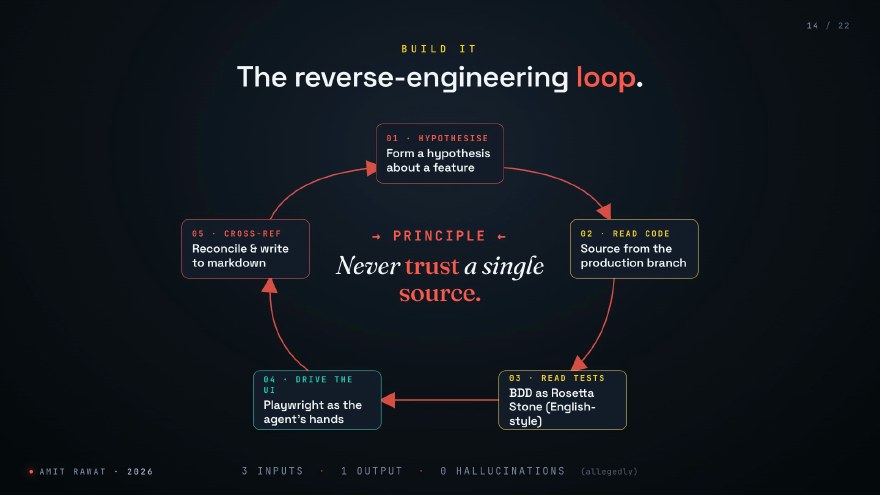
Step one: hypothesise. The agent picks a feature it wants to understand. “I think the cart re-renders when a coupon is applied.” That is the hypothesis.
Step two: read the source code. The released branch, the one actually in production. Not main, not develop. What is running for users right now.
Step three: read the BDD tests. This is where the magic is. BDD tests are written in English. Given, when, then. For an agent, that is a Rosetta Stone: the test files literally explain what the feature is supposed to do, in human language, with examples.
Step four: drive the live UI. Run the actual application locally and let the agent click buttons through Playwright. Not a screenshot. The real app. The agent applies the coupon, watches the cart re-render, confirms the hypothesis. Or finds out the hypothesis was wrong, which is just as valuable.
Step five: cross-reference and write. The agent reconciles what the code said, what the tests said, and what the UI did. Only when the three sources agree does it write a single line of structured markdown.
Never trust a single source.
That is the principle at the centre of the loop. And it has a useful corollary: if the code says one thing and the UI shows another, that is not a bug to fix today. That is a finding worth documenting. Often it is a regression nobody has noticed.
Run this loop on a 20-service product for a few days with a high-context model and you get hundreds of feature pages in structured markdown, every claim traceable to code, tests, or screenshots. That is your knowledge base. Built by experience, not by writing.
Four hidden mines of context
If you have a legacy product, you are sitting on four mines of context most teams never dig.
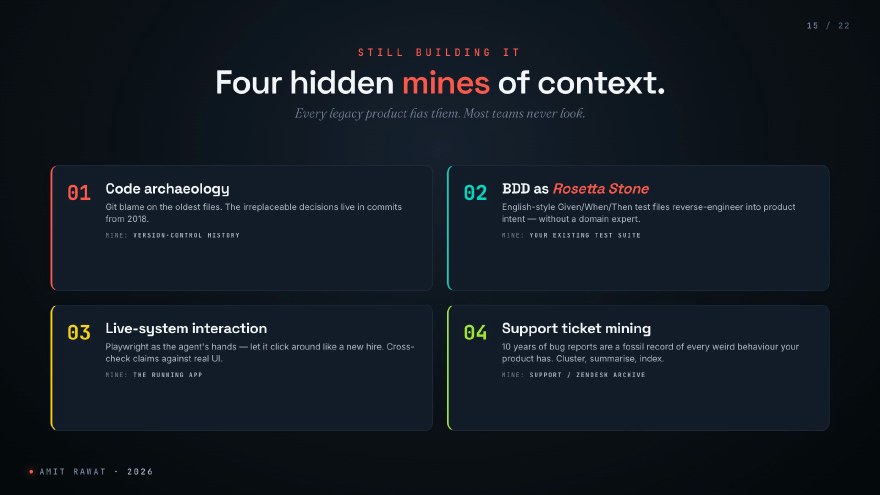
Code archaeology. The oldest files in your repo are where the irreplaceable decisions live. git log and git blame on a file from 2018 is product history that exists in no wiki.
BDD as Rosetta Stone. Given/when/then files let the agent reverse-engineer intent without ever talking to a domain expert. This is the highest-signal input I have found.
Live-system interaction. Spin the product up locally and let the agent drive it like a new hire clicking around, cross-checking the code’s claims against real behaviour.
Support ticket mining. Ten years of bug reports is a fossil record of behaviour. Every weird thing your product has ever done is in there. Cluster, summarise, index.
Mine these four before you write a single doc by hand.
Store it: three patterns, no secret fourth
Once the knowledge exists, you need to store it in a shape an agent can query. Three patterns. All three ship today. I have used all three on different products. Pick by scale and by your team’s tolerance for infrastructure, not by what sounds smartest.
| Markdown + agent skill | RAG / vector store | qmd | |
|---|---|---|---|
| Verdict | start here | when you scale | worth trying |
| Setup cost | hours | days | an afternoon |
| Query-time cost | free | cents per query | cents per query |
| Best for | up to thousands of pages, zero infra | fuzzy semantic retrieval at scale | most of RAG’s benefit, none of the vector-store weight |
| Watch out for | no fuzzy matching: “checkout flow” may miss a page titled “purchase journey” | chunking strategy makes or breaks it | young project, read the README before betting production on it |
Pattern one is plain markdown files in a folder plus a skill that tells the agent how to navigate them. No embeddings, no infrastructure. It is genuinely the right answer for most teams, and it scales further than people expect.
Pattern two is the well-trodden RAG path: vector store, embeddings, a retriever in front. It earns its infrastructure above a few thousand pages or when you need semantic fuzziness. The single biggest decision is chunking strategy. Bad chunking makes a good model look stupid.
Pattern three is qmd, Tobi Lutke’s library that indexes markdown into a queryable surface with hybrid retrieval (BM25 plus vectors plus reranking) and no separate vector store to run. It is the one powering the A/B experiment above, and the one I am most excited about for first-pass context layers.
Three patterns. All valid. No fourth. If a vendor tells you they have a secret fourth pattern, ask them to publish the benchmark.
Surface it: three pipes and the lazy-read rule
A stored knowledge base an agent cannot reach is a slightly tidier Confluence. The last move is surfacing: connecting the KB to the agent. Same data, three pipe shapes.
CLI, MCP, or skill
CLI. Best when your agent runs in a terminal: Claude Code, Cursor, Codex CLI. Lowest token overhead because there is no protocol round-trip; the agent calls a binary like any other shell tool. Setup is minutes.
MCP server. Best when your agent runs in a hosted client like Claude Desktop or ChatGPT. Adds protocol framing, so the token cost is higher, but it makes the same KB reachable from many agent products. Setup is about a day.
Agent skill. Not instead of the others; it wraps them. A skill tells the agent when to reach for the knowledge base, not just that it can. Setup is hours.
In practice you want the stack: wrap a CLI in a skill, expose it via MCP where needed. And notice that the 5 KB skill file in the A/B experiment was this pipe. The whole 2x quality difference travelled through it.
Lazy-read, not eager-load
One pattern matters more than it sounds. Do not dump the knowledge base into the prompt. Let the agent fetch on demand.
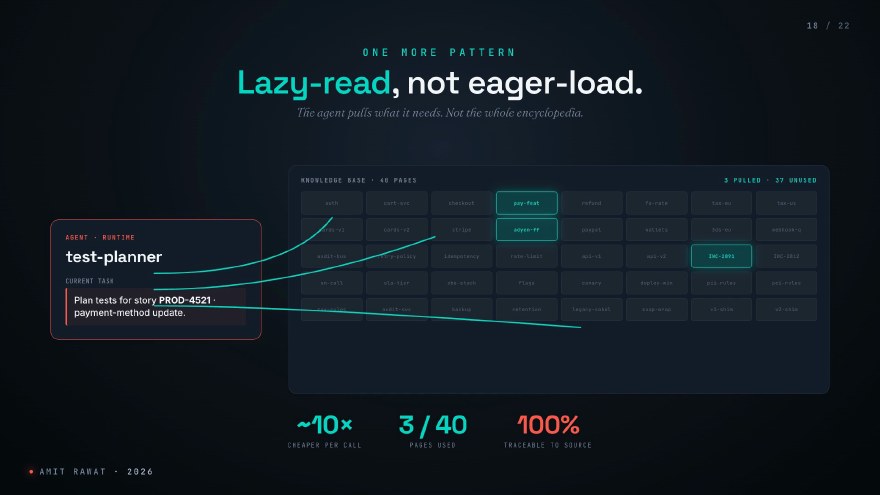
In the shipped-email run, the agent pulled the canonical ticket, hopped its related links to the feature page and two incident reports, then ran a couple of semantic queries for adjacent risk. About 12 KB of material out of a 23-document KB. Three pages out of forty, in the earlier payment-method version of the same experiment. Same grounding effect as eager-loading everything, roughly ten times cheaper per call, faster to respond.
And one property that makes leadership lean in: every claim in the output is traceable to a specific source page. The 50+ citations in the with-skill plan are not decoration. They are what makes auditors stop fighting you.
The runtime picture
Stack the three moves together and this is the runtime picture.
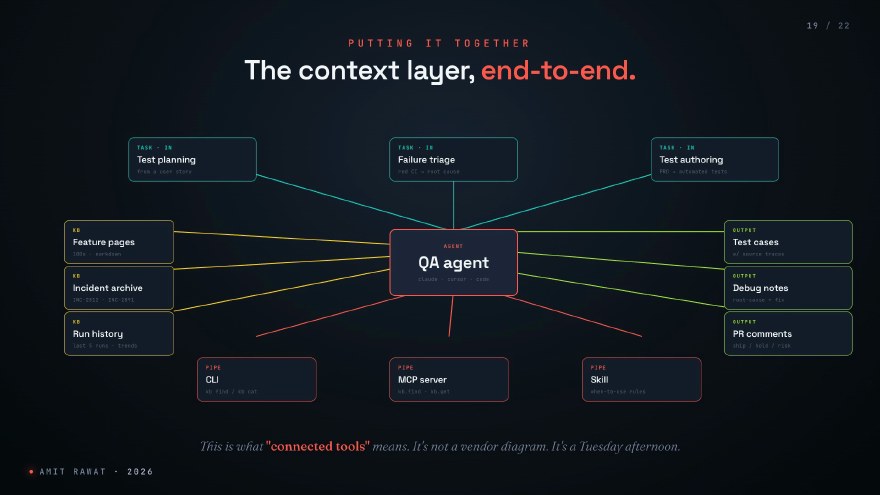
Agent in the middle. Knowledge base on the left: feature pages, incident archive, run history. Pipes underneath: CLI, MCP server, skill. Tasks flowing in from the top: test planning, failure triage, test authoring. Useful output flowing out the right: test cases with traceable sources, debug notes that name the root cause, PR comments that say ship or hold.
This architecture is what “connected tools” means. It is not a vendor diagram. It is a Tuesday afternoon.
Things I’ve broken so you don’t have to
Two honest lists, because this post would be a vendor pitch without them.
Things I have personally broken:
Eager-loading everything. Dump the full KB into context and the cost spirals while the agent gets lost in its own briefing pack. Lazy-read or bust.
Letting the agent edit the KB autonomously. Three weeks later you have a drift problem and no audit trail to debug it with. Knowledge writes need a human in the loop, or at minimum a review queue.
Skipping evals. Every time a new model lands, and they land every quarter, your agent’s quality moves. Without an eval harness you will not notice until production. The KB-grounded agent that was brilliant on Opus 4.7 may regress silently on whatever ships next.
And what does not work yet, regardless of how good your context layer is:
Multi-page stateful exploratory flows. Auth, then payment, then a handoff. Agents still lose the plot across long stateful sessions.
Performance and load reasoning. The KB tells the agent what the app does. It does not tell it how the app behaves under 10x load.
Non-trivial assertions without prior runs. A brand-new test with no history: the agent struggles to pick what to assert beyond “page renders, no 500”. This is exactly why run history is one of the KB sources in the runtime picture.
If a vendor tells you all three of these work today, ask for their eval scores.
Monday morning: three moves
If this post is worth anything to you, it has to survive Monday morning. Three moves, time-boxed.
One: audit. Write down what context your agents actually see today. For most teams the honest answer is “the prompt”. Thirty minutes.
Two: pick one source. BDD tests, support tickets, or your one good feature wiki. Build a small knowledge base from that single source. Two to three days. Do not try to boil the ocean.
Three: wire one pipe. CLI is fastest. Do not add MCP and a skill until the first pipe is earning its keep. One day.
That is the whole rollout. One week, no procurement cycle, no platform migration. The A/B experiment above is reproducible with a folder of markdown, a free CLI, and a 5 KB skill file.
Same model. Different fuel.
The experiment in the middle of this post is the whole argument in miniature. Same model, same prompt, same machine. One agent guessed, plausibly and sometimes wrongly. The other knew what the team had learned, cited it, and flagged the trap in the ticket before writing a single test. The difference was never the model. It was whether anyone had connected the model to what the team already knew.
AI is downstream of context. Connect the tools. Feed the model. Watch the quality lift.
This essay is the long-form, written-down version of a talk I gave at a BrowserStack webinar in May 2026, with the full A/B evidence that the live demo could only gesture at. For more on agentic engineering, including the loop, the storage patterns, and the lazy-read setup in video form, subscribe to The Agentic Engineer on YouTube.